Inhoud blog
  • Original CL vs. ILE CL
  • Windows and Other Functions in iSeries Access PC5250
  • XML, Namespaces, and Expat
  • Quick Download of All Source Members to a PC
  • Retrieve Source Code of ILE CL
    Zoeken in blog

    Qmma developer network

    04-07-2006
    Klik hier om een link te hebben waarmee u dit artikel later terug kunt lezen.Ending the Program from a Subprocedure

    Q: My company has decided to start using subprocedures instead of subroutines so that we can use ILE concepts to improve our applications. In my programs, I like to have a subroutine like the following one:

         C     EndPgm        begsr
          *  Do any additional cleanup here
         C                   close     *ALL                        
         c                   eval      *INLR = *ON
         C                   return
         C                   endsr

    The advantage of this code is that I can end my program from anywhere just by calling the subroutine. I can put cleanup code in the subroutine, and I know it'll always be run. If I convert this subroutine to a subprocedure, it doesn't end the program! If I leave it as a subroutine, I can't call it from subprocedures! What's a poor RPG programmer to do?

    A: First, let me explain why your subroutine works and a corresponding subprocedure doesn't. Consider the following sample program:

          *  Compile with:
          *     CRTBNDRPG PGM(ENDTEST1) SRCFILE(xxx/xxx)
          /free
               dow '1';
                  dsply 'loop';
                  exsr EndNow;
               enddo;
    
               begsr EndNow;
                   *inlr = *on;
                   return;
               endsr;
          /end-free

    The loop is executed only once, because the EndNow subroutine ends the program. How does it do that? It turns on the *INLR indicator, but that doesn't end the program. *INLR is just a variable. There's a point in the RPG cycle at which there's code (generated by the compiler) that checks *INLR to see if it's on, and if it is, it closes the files, resets the variables, and ends the program.

    The RETURN opcode ends the procedure that you run it from and returns control to its caller.

    Let me clarify what I mean by procedure: In ILE languages, including RPG IV, all the code in your program is in a procedure. It's either in the main procedure (which is the case in this example), or it's in a subprocedure. The part of the program that we wrote all our code in before subprocedures were introduced is the "main" procedure. The main procedure is the mainline of your program and is the part that's always been around, even in the RPG II and RPG III days. Everything not in a subprocedure is in the main procedure.

    When the RETURN opcode is executed in this case, it ends the main procedure and returns control to its caller. When the RETURN opcode is run from the main procedure, it also checks *INLR and, if it's on, closes the files, resets the variables, and does all the other stuff that you expect *INLR to do. In this example, the main procedure's caller is the command line, so the user gets control and can run commands or do whatever he or she wants to do next.

    On the other hand, consider the following code:

          *  Compile with:
          *     CRTBNDRPG PGM(ENDTEST2) SRCFILE(xxx/xxx)
         H DFTACTGRP(*NO)
         D EndNow          PR
    
          /free
               dow '1';
                  dsply 'loop';
                   EndNow();
               enddo;
          /end-free
    
         P EndNow          B
         D EndNow          PI
          /free
             *inlr = *on;
             return;
          /end-free
         P                 E

    In this case, the RETURN opcode isn't run from the main procedure. It's run from a subprocedure. When the subprocedure ends, it returns control to its caller. Its caller is the main procedure, which continues looping!

    The preceding example does set *INLR on, so if it were to reach the point in the RPG cycle where the *INLR indicator is set, it would end, but in this case, it doesn't. Another way to make it end would be to run the RETURN opcode from the main procedure. For example, the following code would end:

          *  Compile with:
          *     CRTBNDRPG PGM(ENDTEST3) SRCFILE(xxx/xxx)
         H DFTACTGRP(*NO)
         D EndNow          PR             1N
    
          /free
               dow '1';
                  dsply 'loop';
                  if EndNow();
                    return;
                  endif;
               enddo;
          /end-free
    
         P EndNow          B
         D EndNow          PI             1N
          /free
             *inlr = *on;
             return *ON;
          /end-free
         P                 E

    I recommend the preceding coding style for most subprocedures that want to end the program. Why? Because it makes the subprocedures more reusable. The next program that wants to reuse the same subprocedure might not want the subprocedure to end the program. This way, it's up to the caller whether the program ends or not.

    However, there are situations in which you definitely want the program to end when a subprocedure is called, and you don't want to have to have each subprocedure in the call stack check the result of the previous subprocedure and execute RETURN, which could become very cumbersome.

    Unfortunately, in the ILE model, the call stack is not arranged by program. Subprocedures in one program can call subprocedures in another module, program, or service program directly. Consider this call stack:

    Program1_MainProc
      Program1_SubProc1
        SrvPgm2_SubProc14
          SrvPgm2_SubProc2
            SrvPgm3_SubProc8
                SrvPgm2_SubProc12

    Program1_MainProc is the main procedure for a program named Program1. It's called from the command line. It calls a subprocedure in the same program named SubProc1. Subproc1 calls a procedure named SubProc14 in a service program named SrvPgm2, and so on.

    It might make sense for Program1_SubProc1 to end Program1. But, would it make sense for SrvPgm2_SubProc12 to end SrvPgm2? Should it end SrvPgm3_SubProc8, even though it's not in the same program? Should it completely end SrvPgm3? If it goes down the call stack ending procedures, how should it know where to stop?

    My point is this: You have to think about ending a program a little bit differently in ILE (or any other modular programming environment) than you would in the old days, because of the ability to call subprocedures across module and program boundaries.

    This is one of the reasons that IBM created activation groups. You can group things that belong to a given "program" or "application" and end them all together.

    For example, you could use the Normal End (CEETREC) API to end everything from your "global cleanup" subprocedure.

          *  Compile with:
          *     CRTBNDRPG PGM(ENDTEST4) SRCFILE(xxx/xxx)
         H DFTACTGRP(*NO)
         D EndNow          PR
    
          /free
    
               dow '1';
                  dsply 'loop';
                  EndNow();
               enddo;
    
          /end-free
    
         P EndNow          B
         D EndNow          PI
    
         D CEETREC         PR
         D   rc                          10I 0 const options(*omit)
         D   user_rc                     10I 0 const options(*omit)
    
          /free
             *inlr = *on;
             CEETREC(*omit: 0);
          /end-free
         P                 E

    The CEETREC API finds out which activation group it was called from. It then walks up the call stack and ends every subprocedure in the same activation group. CEETREC stops when it finds a call stack entry in a different activation group, or when it finds a non-ILE program.

    If CEETREC has ended all the call stack entries in the activation group, it also reclaims the activation group itself.

    To say it another way: CEETREC ends your program or service program. If your program or service program was called from another ILE program in the same activation group, CEETREC ends that one, too.

    If the name CEETREC seems a little arcane, there's also the exit() function from ILE C. It does the same thing as CEETREC, but it has a friendly sounding name:

          *  Compile with:
          *     CRTBNDRPG PGM(ENDTEST5) SRCFILE(xxx/xxx)
         H DFTACTGRP(*NO) BNDDIR('QC2LE')
         D EndNow          PR
    
          /free
    
               dow '1';
                  dsply 'loop';
                  EndNow();
               enddo;
    
          /end-free
    
         P EndNow          B
         D EndNow          PI
    
         D exit            PR                  extproc('exit')
         D   status                      10I 0 value
    
          /free
             *inlr = *on;
             exit(0);
          /end-free
         P                 E

    The number that you pass to the exit() and CEETREC() APIs is an "exit status code." In QShell, you can check this code in your shell scripts. By convention, it should be set to zero when the program ends normally, or a number from 1 to 255 if the program ends abnormally. As far as I know, this number isn't used by the operating system at all, and it is useful only from QShell scripts.

    Finally, one other approach to having a global cleanup routine is to register a cleanup subprocedure that's called automatically when the activation group ends. That way, you don't need a special EndNow() subprocedure. Just end the activation group when you're done with your program, and the cleanup routine is called automatically.

    The Register Activation Group Exit Procedure (CEE4RAGE) API lets you configure the ILE environment to call your subprocedure when the activation group ends. Here's an example of that:

          *  Compile with:
          *     CRTBNDRPG PGM(ENDTEST6) SRCFILE(xxx/xxx)
         H DFTACTGRP(*NO)
    
         D EndNow          PR
    
         D my_cleanup      PR
         D   AgMark                      10U 0 const
         D   Reason                      10U 0 const
         D   Result                      10U 0
         D   UserRc                      10U 0
    
         D CEETREC         PR
         D   rc                          10I 0 const options(*omit)
         D   user_rc                     10I 0 const options(*omit)
    
         D CEE4RAGE        PR
         D   procedure                     *   procptr const
         D   feedback                    12A   options(*omit)
    
          /free
    
              CEE4RAGE(%paddr(my_cleanup): *OMIT);
    
          ...  regular program code goes here ...
    
              CEETREC();
    
          /end-free
    
         P my_cleanup      B
         D my_cleanup      PI
         D   AgMark                      10U 0 const
         D   Reason                      10U 0 const
         D   Result                      10U 0
         D   UserRc                      10U 0
          /free
             // do special cleanup here.
             *INLR = *ON;
             dsply 'my_cleanup called!';
          /end-free
         P                 E

    The advantage of this technique is that any procedure in the activation group can call CEETREC when it's done processing, and the my_cleanup() subprocedure is called automatically. The subprocedures don't need to know about my_cleanup(), or even that it exists; they just need to end the activation group, and my_cleanup() is called automatically.

    One benefit of this technique is that the my_cleanup() subprocedure is still called, even if the program crashes and the operating system ends the activation group for you.

    04-07-2006 om 15:17 geschreven door Qmma  


    Klik hier om een link te hebben waarmee u dit artikel later terug kunt lezen.Advanced trigger applications -- part 2

    A trigger program is just like any other program with a few restrictions on what it can do. In part 1 we discussed one of these restrictions: the trigger program's parameter list. Since the system will be calling the trigger program, it's parameter list must be strictly coded. Once a trigger program has been successful called, it can do almost anything a non-trigger program can. In this installment, we'll discuss in detail the other things trigger programs must not and/or should not do.

    Reviewing the trigger categories

    When discussing the restrictions placed on trigger programs, it is important to remember the six types of triggers. The differences among them have to do with why and when they are called. Three record I/O events cause triggers to be called -- deletion, insertion, and update. In addition, a trigger can be configured so it is called either before or after the database carries out the I/O event. This produces the following six possible combinations:

    1. Before delete

    2. After delete

    3. Before insert

    4. After insert

    5. Before update

    6. After update

    Also recall that the same trigger program can be attached to multiple files and/or to the same file multiple times as different types of triggers.

    Four issues regarding trigger inter-operability with i5/OS functions

    Some i5/OS (OS/400) commands affecting physical files may not work as designed when triggers are involved. Here are a few of the more common situations:

    1. When an attempt is made to clear -- either directly or indirectly -- a member of a physical file that has a delete trigger attached to it, the operation will fail with escape message CPF3157. An example of a direct clear-member operation is the Clear Physical File Member (CLRPFM) command. An example of an indirect clear-member operation is the Copy File (CPYF) command when the *REPLACE option is specified for the MBROPT keyword/parameter.

    1. A file's trigger information is not copied to the new file when executing a CPYF command with CRTFILE(*YES). That is, the resulting newly-created file will not have any trigger programs attached to it.

    2. Delete triggers are not called when the associated file is deleted (e.g., using the DLTF command).

    3. To duplicate a file and its associated trigger programs to another library, and have the duplicated trigger programs associated with the duplicated file, first duplicate all the trigger programs, and then duplicate the file to the same library as the duplicated trigger programs. The system will automatically perform the re-association. Note: The duplicated objects should be given the same names as the original objects.

    Operations that are invalid or not recommended in trigger programs

    The following operations are not valid in a trigger program:

    • A commit or rollback operation for the record that caused the trigger to be called.
    • The End Commitment Control (ENDCMTCTL) CL command for the commitment definition being used for the record that caused the trigger to be called.
    • A trigger cannot update (or delete) the record that caused the trigger to be called.
    • SQL Connect, Disconnect, Release, and Set Connection statements.

    In addition, IBM recommends not using the following commands in a trigger program. The commands can be used, but caution should be exercised.

    • Start Commitment Control (STRCMTCTL)
    • Reclaim Spool Storage (RCLSPLSTG)
    • Reclaim Resources (RCLRSC)
    • Change System Library List (CHGSYSLIBL)
    • Delete, Restore, or Save Licensed Program (DLTLICPGM, RSTLICPGM, or SAVLICPGM)
    • Save Library (SAVLIB) command with *YES specified for the SAVACT keyword/parameter.
    • Any command accessing a diskette or tape drive (because of long access times and the possibility that the wrong volume -- or no volume at all -- will be loaded).
    • Any migration commands.
    • Starting debug (a security exposure).
    • Any commands related to remote job entry (RJE).
    • Invoking/calling a program or CL command that results in an interactive entry screen (could reach lock resource limit).


    04-07-2006 om 15:15 geschreven door Qmma  


    Klik hier om een link te hebben waarmee u dit artikel later terug kunt lezen.Advanced trigger applications -- part 1

    The application of triggers to implement solutions for many data processing problems is limited by the imagination only. A trigger program can be attached to (or, associated with) any number of physical files using the ADDPFTRG command. You write the trigger program in the language of your choice. Once attached to a file, the program is called every time a record is deleted, inserted and/or updated. A trigger program is like any other program with a few restrictions on what it can do. Since the system will be calling the trigger program, its parameter list must be strictly coded. Other than that, a trigger can do just about anything a typical program might. And, the same trigger program can be attached to multiple files and to the same file multiple times.

    Six categories of triggers The difference between the six types of triggers has to do with when they are called. Three record I/O events cause triggers to be called -- deletion, insertion and update. A trigger can be configured either so it is called before or after the database carries out the I/O event. That produces the following six possible combinations:

    1. Before delete

    2. After delete

    3. Before insert

    4. After insert

    5. Before update

    6. After update

    The trigger parameter list

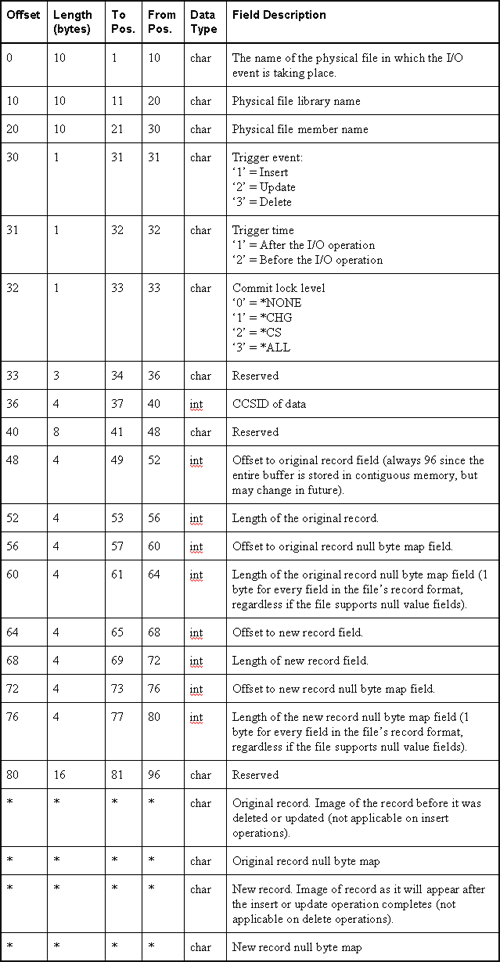
    Programs destined for trigger-hood must accept exactly two parameters. The first, an input buffer data structure, will contain all the information associated with the event that caused the trigger to be called. The second parameter, a four-byte integer, contains the length of the input buffer (i.e., the first parameter).

    The chart below describes the layout of the input buffer parameter. Notice the last four fields of the input buffer structure. The offset, position, and length are not specified because it depends on the record length. Use the RPG SUBST op-code and the offset and length fields (positions 49-80 of the buffer) to extract the record images and null-byte maps. Note, SUBST requires a starting position not an offset, therefore, you must add a one to the offset to get a position. Alternatively, you can use pointers and based-on variables to make that process easier. When using pointers, you can use the offsets as-is to position the pointers to the proper place in the buffer.

    04-07-2006 om 15:14 geschreven door Qmma  


    Klik hier om een link te hebben waarmee u dit artikel later terug kunt lezen.Convert an excel file to EBCDIC and then upload to an AS/400 physical file

    First method :

    First, you need to run an interactive data transfer download from the Physical File (PF) to a PC data file.

    The PF should be the file that you will eventually upload the excel data to. On this step, make sure that you change the output device to FILE, specify the path and filename and then click the DETAILS button.

    On this screen make sure that the file type specified is that which you will eventually upload (in your case BIFF3 BIFF4 or BIFF5 depending on the Excel worksheet version you are saving the spreadsheet to). Also, make sure that the SAVE TRANSFER DESCRIPTION option is checked. This will create the FDF file which you will need for the next step.

    Second, create a data transfer upload request.

    Specify the PC data file you wish to upload (the Excel file), the PF you wish to upload to (the one you downloaded from in the previous step), and then click the DETAILS button.

    Make sure the USE PC FILE DESCRIPTION FILE box is checked and that the name entered matches the FDF file that was created in the previous step. Select Translate from ANSI to EBCDIC. Make sure NO REPLACE MEMBER ONLY is specified in the create object section. Click OK out of DETAILS and run the upload.

    Second method :

    Another approach would be using the CPYFRMIMPF CL command.

    1. Define target table with DDS or SQL.
    2. Export Excel file into delimited format.
    3. FTP delimited format file to your iSeries server.
    4. Use CPYFRMIMPF CL command to load the delimited format file into the target table.

    04-07-2006 om 15:12 geschreven door Qmma  


    Klik hier om een link te hebben waarmee u dit artikel later terug kunt lezen.Use F9 = Retrieve for PDM Options

    Q: I want to use PDM option 14 to compile my program, or run a user-defined option and retrieve the command later with F9=Retrieve. How can I do that?

    A: The F9=Retrieve option works by retrieving certain types of messages from your job log. This means that for F9=Retrieve to work, you have to make sure that the commands that PDM runs get logged.

    The first thing to check is in the PDM default settings. Press F18 from within PDM to change your defaults. Press the Page Down key to scroll to the second screen. There, you find the Log option commands setting. Make sure it's set to Y=Yes.

    Here's what the second page of the F18=Options screen looks like:

                                    Change Defaults                                 
                                                                                    
     Type choices, press Enter.                                                     
                                                                                    
       Log option commands . . . . .  N            Y=Yes, N=No   <-- Set this to Y!
       Exit lists on ENTER   . . . .  Y            Y=Yes, N=No                      
       Display informational messages 2            1=Yes, 2=No                      
       Refresh part list . . . . . .  Y            Y=Yes, N=No                      
       Display source parts only . .  N            Y=Yes, N=No                      


                                                                             Bottom 
      F3=Exit    F5=Refresh     F12=Cancel

    You also need to make sure that your job is configured to allow logging. One easy way to turn this option on is to run the following command:

      CHGJOB LOG(4 00 *NOLIST)

    This changes your job so that all messages are logged to the job log. The CHGJOB command changes the logging level for the current job only, so if you sign off and back on again, you have to run that command again. However, you can change it permanently by changing your job description as follows:

      CHGJOBD JOBD(my-job-description) LOG(4 00 *NOLIST)

    After you make those two changes, the F9=Retrieve option should allow retrieval of the commands. For example, if I use option 14 to compile an SQLRPGLE program, I can press F9 to see the exact CRTSQLRPGI command that PDM ran.

    04-07-2006 om 15:12 geschreven door Qmma  


    Klik hier om een link te hebben waarmee u dit artikel later terug kunt lezen.Where is the infocenter ?

    V5R3 infocenter : http://publib.boulder.ibm.com/infocenter/iseries/v5r3/index.jsp

    V5R4 infocenter : http://publib.boulder.ibm.com/infocenter/iseries/v5r4/index.jsp

    IBM System i5 main page www-03.ibm.com/systems/i/

    04-07-2006 om 15:07 geschreven door Qmma  


    Klik hier om een link te hebben waarmee u dit artikel later terug kunt lezen.Sending Messages to QHST

    One feature of the SNDMSG (Send Message) command is its ability to send a message to the system's history log, QHST. QHST automatically tracks high-level activities on your system, such as the start and completion of jobs, device status changes, system operator messages and replies, and PTF activity.

    Sending messages to QHST can enhance application auditing. For instance, let's say you want to monitor a certain report to determine who uses it and how often. In a CL program that submits or executes the report, you could simply add a statement like this:

    SNDMSG MSG('Report ABC requested by user' *BCAT  &USER)  TOMSGQ(QHST)

    where &USER is a CL variable that contains the current user profile, which the program can retrieve by using the RTVJOBA (Retrieve Job Attributes) command. You could then display the contents of QHST by using the DSPLOG (Display Log) command.

    The SNDPGMMSG (Send Program Message) command lets you perform this function as well. Experiment with these commands to see how sending messages to QHST can give you insight about the way your applications are being used.

    04-07-2006 om 15:05 geschreven door Qmma  


    Klik hier om een link te hebben waarmee u dit artikel later terug kunt lezen.Searching for an API on the iSeries

    If you are searching for an API to use in a program click on this link :

    http://publib.boulder.ibm.com/iseries/v5r2/ic2924/index.htm?info/apis/apifinder.htm

    04-07-2006 om 14:02 geschreven door Qmma  


    Klik hier om een link te hebben waarmee u dit artikel later terug kunt lezen.Replace CALL/PARM with Prototypes

    RPG programmers have traditionally used the CALL and PARM opcodes to call programs. These opcodes are error prone and are no longer required to call programs from RPG. Instead, prototypes offer a much better (and safer!) alternative.

    This article explains why prototypes are better and shows you how to use prototypes in your RPG programs.

    One of the best features of the iSeries is sometimes the most frustrating: Parameters work by sharing memory between programs. When one program calls another program, it does so by sharing the memory of a variable. Consider the following sample code:

         D InvInfo         ds
         D   Amount                       9S 2
         D   Tax                          7S 2
         D   CustNo                       8A
         D   InvNo                       10A
           .
           .
         C              
         C                   CALL      'CALCTAX'
         C                   PARM                    Amount
         C                   PARM                    Tax

    The idea is, this program has a data structure that contains information about an invoice. The data structure has the invoice's amount, the customer number, and the invoice number. This program calls another program to calculate tax on the invoice amount.

    Just to keep things simple for this example, let's say that tax is always calculated at 5 percent. The CALCTAX program would therefore look like this:

         D Amount          s              9S 2
         D Tax             s              9S 4
    
         C     *ENTRY        PLIST
         C                   PARM                    Amount
         c                   PARM                    Tax
    
         C                   eval(h)   Tax = Amount * 0.05
         C                   return

    There's a problem in this code. Did you spot it? For example, if the Amount field is set to 100.00, the tax should be 5.00. And it will be, so that's OK. But there's a problem with the CustNo field.

    After you call this program, the first two characters of the CustNo field are changed to numbers. If the input amount is 100.00, the first two characters of CustNo are changed to 00. Can you see why?

    The reason that it happens is because the parameters aren't defined the same way. The calling program defines Tax as a 7S 2 field. However, the CALCTAX program has it defined as 9S 4. The extra two decimal places in the Tax field overlap the CustNo field and cause a very strange, hard-to-find error.

    Parameters on the iSeries work by "sharing memory" between programs. When the caller calls the CALCTAX program, it doesn't tell it the data types or the lengths of the parameters. The only thing it tells it is where the parameters should be in memory. Nothing else besides a memory address is passed.

    If you're unfamiliar with memory addresses, you can think of them as being like a data structure with overlapping fields. For example:

         D                 ds
         D caller_Amount           1      9S 2
         D caller_Tax             10     16S 2
         D caller_CustNo          17     24A
         D caller_InvNo           25     34A
         D calctax_Amount          1      9S 2
         D calctax_Tax            10     18S 4

    Consider this data structure a metaphor for the way memory works. Just as a data structure has starting and ending positions for each field, so does memory. Granted, because your memory is much larger (probably billions of bytes long) the numbers would be much higher. The same principle applies, though. When fields occupy the same positions in memory, changing one changes the other.

    That's what I mean when I say that parameters work by sharing memory. They occupy the same physical space in the computer's main storage. When you change one, it changes the other one. That's how programs can use parameters to pass data back and forth.

    Looking at the data structure in the example, you can also see quite clearly why changing the contents of the Tax field in the CALCTAX program causes the customer number to be partially overwritten. Because the CALCTAX version is larger, it ends up overlapping the field that happens to come next in memory.

    In my preceding example, the data structure forced the CustNo field to appear directly after the Tax field in memory. But what if it hadn't been in a data structure? What if it had been a standalone field? What would've been the next field in memory in that case?

    The answer is: I don't know. Predicting what would've been there is very difficult. It might've been another variable in this program, or it might've been extra bytes in memory that the system wasn't using, or it might've been a variable in a different program -- or memory used by the operating system!

    Imagine trying to troubleshoot a bug in a completely unrelated program, where extra numbers are appearing in some random field. How hard would it be to determine that it was caused by mismatched parameters in this program? Fortunately, that situation comes up rarely, but it's pretty scary, don't you think?

    Why couldn't this have been prevented? Why couldn't the compiler catch the error when I compiled my programs? The reason is simple . . . the compiler didn't know that the CALCTAX program expected a 9S 4 field. It had no way to know that. Similarly, when I compiled the CALCTAX program, it had no way of knowing which programs were going to call it, or how they were going to pass their parameters.

    The solution is to tell the compiler what sort of parameters you expect, to code a "blueprint" for your program that, if used, tells the compiler exactly which parameters must be passed, how big they are, and what data type they are.

    These "blueprints" exist today. In fact, they've been around since V3R2 was released in the mid-1990s. They're called prototypes.

    Here's a sample prototype for the CALCTAX program:

         D CALCTAX         PR                  ExtPgm('CALCTAX')
         D   Amount                       9S 2
         D   Tax                          9S 4

    Because I want to make sure that both CALCTAX and the programs that call it use the same prototype, I put it in a member by itself. I call the member CALCTAX_H.

    The prototype starts with a D-spec that has the letters PR coded in positions 24-25. This indicates that it's a prototype. The EXTPGM keyword indicates that the prototype calls a program (as opposed to a subprocedure) and that the program's external name is CALCTAX.

    The two lines that follow the PR line are the parameters that must be passed to the CALCTAX program.

    The names of the parameters in the prototype are for documentation purposes only. They're just there to make it clear to someone who uses this prototype that the two fields are an Amount field and a Tax field. The fact that these names are listed on the prototype does not mean that I've declared variables with those names.

    Here's the revised code for the CALCTAX program:

          /copy CALCTAX_H
    
         D CALCTAX         PI
         D   Amount                       9S 2
         D   Tax                          9S 4
    
         C                   eval(h)   Tax = Amount * 0.05
         C                   return

    As you can see, I removed the *ENTRY PLIST from this program and replaced it with something that looks similar to a prototype, except that it has PI in column 24 instead of PR.

    The PI stands for "Procedure Interface," and it does the same thing that an *ENTRY PLIST does. It declares which parameters are input to a program. So the prototype is the blueprint that the compiler uses to make sure that you're passing the right parameters, and the PI is the actual *ENTRY PLIST. If you want to make sure that there are no errors, the two have to match.

    In fact, it's possible to code a prototype but continue using *ENTRY PLIST. The prototype still calls the program correctly. The advantage of using PI instead of *ENTRY PLIST is that the compiler verifies that the PI definitions are the same as the PR definitions. A program with a PI statement must have a matching prototype, or it doesn't compile.

    Unlike the prototype, the parameters on the PI statement are actual variable declarations, so the Amount and Tax variables needn't be redefined in the CALCTAX program.

    Now, let's use that prototype in the caller. Here's some updated sample code for the calling program:

          /copy CALCTAX_H
    
         D InvInfo         ds
         D   Amount                       9S 2
         D   Tax                          7S 2
         D   CustNo                       8A
         D   InvNo                       10A
    
         C                   CALLP     CALCTAX(Amount : Tax)
    ** RNF7535 The type and attributes of parameter 2 do not match those of
    the prototype.

    Instead of using the CALL and PARM opcodes, I used the CALLP (Call with Prototype) opcode to run the CALCTAX program. Let me point out that CALLP does not stand for "call procedure." This is a common misconception. In fact, CALLP stands for "call with prototype," and it can be used to call programs and Java methods in addition to procedures.

    Now that we're using the prototype, the compiler catches the error. It doesn't let the preceding code compile, because the definition of my Tax field doesn't match what the prototype requires. To fix this, I change my definition of Tax, as follows:

         D InvInfo         ds
         D   Amount                       9S 2
         D   Tax                          9S 4
         D   CustNo                       8A
         D   InvNo                       10A

    After I make that change, my program compiles and runs without the unexpected results. I am protected against errors because I used a prototype.

    In addition to making it possible for the compiler to protect you against errors (as I've demonstrated here) prototypes also provide lots of new features unavailable with the CALL, PARM, and PLIST opcodes.

    04-07-2006 om 14:01 geschreven door Qmma  


    Klik hier om een link te hebben waarmee u dit artikel later terug kunt lezen.Define structure LDA in Rpg program

    The advantage of this method is as a field change of length then you do not
    need to re-calculate the start and end positions in the data structure.

    Example :

    Part of file definition LDA :

    PHYSICAL: LDA EXTERNAL DEFINITION LOCAL DATA AREA (*LDA)

    Field   Length   Text                        From   To

    RLSUSR    10 A   USER NAME                      1   10
    RLSNBR    10 A   JOB NO                        11   20
    RLSINL    10 A   INLOGMENU                     21   30 
             . . .
    LDFIL1   144 A    FILLER                      244  387
    LDFIL2   256 A    FILLER                      388  643
    LDFIL3   256 A    FILLER                      644  899
    #SPJBQ   10 A     JOB QUEUE                   900  909
    #SPOUT   10 A     OUTPUT QUEUE                910  919


    D-line in Rpg program :

    D Lda   E   Ds        Dtaara(*Lda)
    D                     Extname(Lda)
    * Incoming fields
    D Lda_Cnft      10A   Overlay(LdFil2)
    D Lda_Sern      10A   Overlay(LdFil2:*Next)
    D Lda_Cnno       7A   Overlay(LdFil2:*Next)
    D Lda_Umcn       7A   Overlay(LdFil2:*Next)
    D Lda_Cadn       6A   Overlay(LdFil2:*Next)
    D Lda_Icno       6A   Overlay(LdFil2:*Next)
    D Lda_Cfno       7A   Overlay(LdFil2:*Next)
    D Lda_Lsta       2A   Overlay(LdFil2:*Next)
    D Lda_Sysn       7A   Overlay(LdFil2:*Next)
    D Lda_Ordn      10A   Overlay(LdFil2:*Next)
    D Lda_Cnty       4A   Overlay(LdFil2:*Next)
    D Lda_Bti1       1A   Overlay(LdFil2:*Next)
    D Lda_Bti2       1A   Overlay(LdFil2:*Next)
    D Lda_Btae       1A   Overlay(LdFil2:*Next)
    D Lda_Vlcc       5A   Overlay(LdFil2:*Next)
    D Lda_Srhn      30A   Overlay(LdFil2:*Next)
    D Lda_Adr1      40A   Overlay(LdFil2:*Next)
    D Lda_Town      25A   Overlay(LdFil2:*Next)
    D Lda_Pscd      10A   Overlay(LdFil2:*Next)
    D Lda_Tel       14A   Overlay(LdFil2:*Next)
    D Lda_Drtr       8A   Overlay(LdFil3)
    D Lda_Drfc       8A   Overlay(LdFil3:*Next)
    D Lda_Drtc       8A   Overlay(LdFil3:*Next)

    04-07-2006 om 13:58 geschreven door Qmma  


    Klik hier om een link te hebben waarmee u dit artikel later terug kunt lezen.Example of free-format.

        100       ************************************************************
        800       * General Description :
        900
       1000       * Program Modifications :
       1100
       1200       * Initial     Date      Description
       1300       * --------    --------  -------------------------------
       1400       *                       Creation program
       1500
       1600       ***********************************************************
       1700
       8000      H NoMain Optimize(*None)
       8100
       8200       *=========================================================*
       8300       * File specifications     *F*                             *
       8400       *=========================================================*
       8500      FMci_L2    IF   E           K Disk    UsrOpn
       8600      FMcm_L2    IF   E           K Disk    UsrOpn
       8700
       8800       *=========================================================*
       8900       * Definition specifications       *D*                     *
       9000       *=========================================================*
       9100
       9200      D ReturnValue     Ds
       9300      D  CfnoValidate                   N   Inz(*Off)
       9400
       9500      D OpenMci_L2      S               N   Inz(*Off)
       9600      D OpenMcm_L2      S               N   Inz(*Off)
       9700      D InitOk          S               N   Inz(*Off)
       9800
       9900      D P_Load          S              8A   Inz
      10000      D P_Process       S              8A   Inz
      10100      D P_Received      S              8A   Inz
      10200      D P_Send          S              8A   Inz
      10300      D P_Error         S              8A   Inz
      10400      D P_Validate      S              8A   Inz
      10500
      10600       *=========================================================*
      10700       * Prototype                                               *
      10800       *=========================================================*
      10900
      11000       * Return           - Datastructure ReturnValue
      11100       * Input parameters - Configuration number
      11200      D CheckConfigurationValidated...
      11300      D                 Pr                  Like(ReturnValue)
      11400      D  I_ConfigNo                         Like(Mci_Cfno) Value
      11500
      11600       *========================================================*
      11700       * Procedures                      *P*                    *
      11800       *========================================================*
      11900
      12000      P CheckConfigurationValidated...
      12100      P                 B                   Export
      12200
      12300       * Procedure Interface.
      12400      D                 Pi                  Like(ReturnValue)
      12500      D  I_ConfigNo                         Like(Mci_Cfno) Value
      12600
      12700       * Program Definition specifications.
      12800      D Rsm462r         Pr                  Extpgm('RSM462R')
      12900      D   P_Load                       8A
      13000      D   P_Process                    8A
      13100      D   P_Received                   8A
      13200      D   P_Send                       8A
      13300      D   P_Error                      8A
      13400      D   P_Validate                   8A
      13500
      13600       * Local Definition specifications.
      13700      D Sw_CfnoValid    S               N   Inz(*On)
      13800
      13900       *=========================================================*
      14000       * Key and Parameter Lists                                 *
      14100       *=========================================================*
      14200
      14300      D K01Mci_L2       Ds                  Likerec(Mci_r:*Key)
      14400
      14500      D K03Mcm_L2       Ds                  Likerec(Mcm_r:*Key)
      14600
      14700       /Free
      14800
      14900        // ======================================================
      15000        // Main logic
      15100        // ======================================================
      15200
      15300        // Initialisation.
      15400           Exsr Init;
      15500
      15600           If InitOk;
      15700
      15800              Sw_CfnoValid = *On;
      15900
      16000           // Fill key fields to read file Mci_ .
      16100              K01Mci_L2.Mci_Cfno = I_ConfigNo;
      16200
      16300           // Read configuration in file Mci_ .
      16400              Chain %Kds(K01Mci_L2) Mci_L2;
      16500              If %Found(Mci_L2);
      16600
      16700              // Test interface process status.
      16800                 If Mci_Ipst <> P_Validate;
      16900                    Sw_CfnoValid = *Off;
      17000                 Endif;
      17100
      17200              Else;
      17300
      17400                 Sw_CfnoValid = *Off;
      17500
      17600              Endif; // %Found(Mci_L2)
      17700
      17800
      17900           // Fill key fields to read file Mcm_ .
      18000              K03Mcm_L2.Mcm_Cfno = I_ConfigNo;
      18100              Clear K03Mcm_L2.Mcm_Csqn;
      18200              Clear K03Mcm_L2.Mcm_Seq3;
      18300
      18400           // Read all configuration lines in file Mcm_ .
      18500              Setll %Kds(K03Mcm_L2:1) Mcm_L2;
      18600              Reade %Kds(K03Mcm_L2:1) Mcm_L2;
      18700              Dow Not %Eof(Mcm_L2);
      18800
      18900             // Test interface process status.
      19000                If Mcm_Ipst <> P_Validate;
      19100                   Sw_CfnoValid = *Off;
      19200                   Leave;
      19300                Endif;
      19400
      19500              Reade %Kds(K03Mcm_L2:1) Mcm_L2;
      19600              Enddo;  // Not %Eof(Mcm_L2)
      19700
      19800
      19900           Endif; // InitOk
      20000
      20100        // Fill return fields in data structure ReturnValue.
      20200           CfnoValidate = Sw_CfnoValid;
      20300
      20400        // Close the files.
      20500           Exsr CleanUp;
      20600
      20700        // Return to Caller.
      20800           Return ReturnValue;
      20900
      21000        // ======================================================
      21100        // Subroutine :
      21200        // ======================================================
      21300
      21400        // ======================================================
      21500        // Subroutine : Init - Initialisation
      21600        // ======================================================
      21700           Begsr Init;
      21800
      21900            InitOk     = *On;
      22000            OpenMci_L2 = *Off;
      22100            OpenMcm_L2 = *Off;
      22200
      22300           // Open files
      22400              If InitOk;
      22500
      22600                 Open(E) Mci_L2;
      22700                 If Not %Error;
      22800                    OpenMci_L2  = *On;
      22900                    Else;
      23000                    OpenMci_L2  = *Off;
      23100                    InitOk = *Off;
      23200                 Endif;
      23300
      23400              Endif; // InitOk
      23500
      23600              If InitOk;
      23700
      23800                 Open(E) Mcm_L2;
      23900                 If Not %Error;
      24000                    OpenMcm_L2  = *On;
      24100                    Else;
      24200                    OpenMcm_L2  = *Off;
      24300                    InitOk = *Off;
      24400                 Endif;
      24500
      24600              Endif; // InitOk;
      24700
      24800         // Status interface process I-Base OCS to SAP.
      24900            Callp RSM462R
                                
                            (P_Load:P_Process:P_Received:P_Send:P_Error:P_Validate);
      25000
      25100         // Initialise helpfields, output data structure.
      25200            Clear ReturnValue;
      25300
      25400           Endsr; // Init
      25500
      25600        // =====================================================
      25700        // Subroutine : CleanUp - CleanUp
      25800        // =====================================================
      25900           Begsr CleanUp;
      26000
      26100            If OpenMci_L2;
      26200
      26300               Close(E)  Mci_L2;
      26400               If Not %Error;
      26500                  OpenMci_L2 = *Off;
      26600               Endif;
      26700
      26800            Endif;
      26900
      27000            If OpenMcm_L2;
      27100
      27200               Close(E)  Mcm_L2;
      27300               If Not %Error;
      27400                  OpenMcm_L2 = *Off;
      27500               Endif;
      27600
      27700            Endif;
      27800
      27900           Endsr; // CleanUp
      28000
      28100       /End-Free
      28200
      28300      P CheckConfigurationValidated...
      28400      P                 E
      28500

    04-07-2006 om 13:57 geschreven door Qmma  


    Klik hier om een link te hebben waarmee u dit artikel later terug kunt lezen.Convert to lower case or upper case.


       1900       *H*********************************************************************
       2000       *H Procedures
       2100       *H ----------
       2200       *H ClrToLower(ToBeCovertedString :APIErrorSwitch : CCSID)
       2300       *H    This procedure can be used to convert all characters from a String from lower
       2400       *H    to lower Case.
       2500       *H
       2600       *H ClrToUpper(ToBeCovertedString :APIErrorSwitch : CCSID)
       2700       *H    This procedure can be used to convert all characters from a String from lower
       2800       *H    to upper Case.
       2900       *H
       3000       *H*********************************************************************

       3100       *====================================================================*
       3200       * HEADER SPECIFICATIONS *         *H*                                    *
       3300       *====================================================================*
       9600      HNoMain Optimize(*None)

      10000       *====================================================================*
      10100       * DEFINITION SPECIFICATIONS       *D*                                    *
      10200       *====================================================================*

      10700       **************************
      10800       *  Prototype calls       *
      10900       **************************

      11000       * CvtCaseAPI - Convert case API (QlgConvertCase)
      11100      D CvtCaseAPI      Pr                  ExtProc( 'QlgConvertCase' )
      11200      D                               22    Const
      11300      D                            32767    Options( *VarSize )
      11400      D                            32767    Options( *VarSize )
      11500      D                               10I 0 Const
      11600      D                              272

      11700       * CvtCase - Convert case
      11800      D CvtCase         Pr         32765    Varying
      11900      D                            32765    Const
      12000      D                                     Varying
      12100      D                               10    Const
      12200      D                              272    Options( *NoPass )
      12300      D                               10I 0 Const
      12400      D                                     Options( *NoPass )

      12500       * CvtToUpper - Convert to uppercase
      12600      D CvtToUpper      Pr         32765    Varying
      12700      D  InputStr                  32765    Const
      12800      D                                     Varying
      12900      D  APIError                    272    Options( *NoPass )
      13000      D  CCSIDIn                      10I 0 Const
      13100      D                                     Options( *NoPass )

      13200       * CvtToLower - Convert to lowercase
      13300      D CvtToLower      Pr         32765    Varying
      13400      D InputStr                   32765    Const
      13500      D                                     Varying
      13600      D APIError                     272    Options( *NoPass )
      13700      D CCSIDIn                       10I 0 Const
      13800      D                                     Options( *NoPass )

      13900       *=====================================================================*
      14000       * Procedure  : CvtCase            *P*                                    *
      14100       * Description: Convert case                                              *
      14200       *=====================================================================*
      14300      P CvtCase         B

      14400       * Procedure Interface
      14500       * -------------------
      14600      D CvtCase         PI         32765    Varying
      14700      D InputStr                   32765    Const
      14800      D                                     Varying
      14900      D CvtType                       10    Const
      15000      D APIError                     272    Options( *NoPass )
      15100      D CCSIDIn                       10I 0 Const
      15200      D                                     Options( *NoPass )

      15300       * Local variables
      15400       * ---------------
      15500      D CtlBlock        DS
      15600      D  RqsType                      10I 0 Inz( 1 )
      15700      D  RqsCCSID                     10I 0
      15800      D  RqsCase                      10I 0
      15900      D                               10    Inz ( *AllX'00' )
      16000       *
      16100      D OutputStr       S          32765    Varying
      16200       *
      16300      D FixedInputStr   S          32765
      16400      D FixedOutputStr  S          32765
      16500       *
      16600      D NoAPIError      C                   Const( *Zero )
      16700      D APIErrorPassed  S               N
      16800       *
      16900      D APIErrorDS      DS
      17000      D  BytesProvided                10I 0 Inz( %Size( APIErrorDS ) )
      17100      D  BytesAvail                   10I 0 Inz( *Zero )
      17200      D  MsgID                         7    Inz( *Blanks )
      17300      D                                1    Inz( X'00' )
      17400      D  MsgDta                      256    Inz( *Blanks )

      17500       * Main
      17600       * ----

      17700       *C Determine whether API error parameter was passed
      17800      C                   If        %Parms > 2
      17900      C                   Eval      APIErrorPassed = *On
      18000      C                   EndIf

      18100       *C Set conversion type
      18200      C                   Select
      18300      C                   When      CvtType = '*UPPER'
      18400      C                   Eval      RqsCase = *Zero
      18500      C                   When      CvtType = '*LOWER'
      18600      C                   Eval      RqsCase = 1
      18700      C                   EndSl

      18800       *C Convert case
      18900      C                   Reset                   APIErrorDS
      19000       *
      19100      C                   If        %Parms > 3
      19200      C                   Eval      RqsCCSID = CCSIDIn
      19300      C                   Else
      19400      C                   Eval      RqsCCSID = *Zero
      19500      C                   EndIf
      19600       *
      19700      C                   Eval      FixedInputStr = InputStr
      19800      C                   Eval      FixedOutputStr = OutputStr
      19900      C                   CallP     CvtCaseAPI
      20000      C                              (CtlBlock
      20100      C                               :FixedInputStr
      20200      C                               :FixedOutputStr
      20300      C                               :%Len( InputStr )
      20400      C                               :APIErrorDS)
      20500      C                   If        BytesAvail <> NoAPIError
      20600      C                   ExSr      ReturnError
      20700       *                  ----      -----------
      20800      C                   EndIf
      20900       *
      21000      C                   Eval      OutputStr = FixedOutputStr
      21100      C                   Eval      %Len( OutputStr ) = %Len( InputStr )

      21200      C                   Return    OutputStr

      21300       **********************************************************************
      21400       *  ReturnError * Return error condition to caller
      21500       **********************************************************************
      21600      C     ReturnError   BegSr
      21700       *    -----------   -----
      21800      C                   If        APIErrorPassed
      21900      C                   Eval      APIError = APIErrorDS
      22000      C                   EndIf
      22100       *
      22200      C                   Return    *Blank
      22300       *
      22400      C                   EndSr
      22500       *
      22600      P CvtCase         E

      22700       *=====================================================================*
      22800       * Procedure  : CvtToUpper         *P*                                    *
      22900       * Description: Convert to uppercase                                      *
      23000       *=====================================================================*
      23100      P CvtToUpper      B                   Export

      23200       * Procedure Interface
      23300       * -------------------
      23400      D CvtToUpper      PI         32765    Varying
      23500      D InputStr                   32765    Const
      23600      D                                     Varying
      23700      D APIError                     272    Options( *NoPass )
      23800      D CCSIDIn                       10I 0 Const
      23900      D                                     Options( *NoPass )

      24000       * Local variables
      24100       * ---------------
      24200      D OutputStr       S          32765    Varying
      24300      D CCSID           S             10I 0 Inz( *Zero )
      24400       *
      24500      D NoAPIError      C                   Const( *Zero )
      24600      D APIErrorPassed  S               N
      24700       *

      24800      D APIErrorDS      DS
      24900      D  BytesProvided                10I 0 Inz( %Size( APIErrorDS ) )
      25000      D  BytesAvail                   10I 0 Inz( *Zero )
      25100      D  MsgID                         7    Inz( *Blanks )
      25200      D                                1    Inz( X'00' )
      25300      D  MsgDta                      256    Inz( *Blanks )

      25400       * Main
      25500       * ----

      25600       *C Determine whether API error parameter was passed
      25700      C                   If        %Parms > 1
      25800      C                   Eval      APIErrorPassed = *On
      25900      C                   EndIf
      26000       *C Convert case
      26100      C                   Reset                   APIErrorDS
      26200       *
      26300      C                   If        %Parms > 2
      26400      C                   Eval      CCSID = CCSIDIn
      26500      C                   EndIf
       26600       *
      26700      C                   Eval      OutputStr = CvtCase
      26800      C                                        (InputStr
      26900      C                                        :'*UPPER'
      27000      C                                        :APIErrorDS
      27100      C                                        :CCSID)
      27200       *
      27300      C                   If        BytesAvail <> NoAPIError
      27400      C                   ExSr      ReturnError
      27500       *                  ----      -----------
      27600      C                   EndIf
      27700       *                  ----      -----------

      27800      C                   Return    OutputStr

      27900       **********************************************************************
      28000       *  ReturnError * Return error condition to caller
      28100       **********************************************************************
      28200      C     ReturnError   BegSr
      28300       *    -----------   -----
      28400      C                   Eval      APIError = APIErrorDS
      28500      C                   Return    *Blank
      28600      C                   EndSr
      28700       *
      28800      P CvtToUpper      E

      28900       *====================================================================*
      29000       * Procedure  : CvtToLower         *P*                                    *
      29100       * Description: Convert to lowercase                                      *
      29200       *====================================================================*
      29300      P CvtToLower      B                   Export

      29400       * Procedure Interface
      29500       * -------------------
      29600      D CvtToLower      PI         32765    Varying
      29700      D InputStr                   32765    Const
      29800      D                                     Varying
      29900      D APIError                     272    Options( *NoPass )
      30000      D CCSIDIn                       10I 0 Const
      30100      D                                     Options( *NoPass )

      30200       * Local variables
      30300       * ---------------
      30400      D OutputStr       S          32765    Varying
      30500      D CCSID           S             10I 0 Inz( *Zero )
      30600       *
      30700      D NoAPIError      C                   Const( *Zero )
      30800      D APIErrorPassed  S               N
      30900       *

      31000      D APIErrorDS      DS
      31100      D  BytesProvided                10I 0 Inz( %Size( APIErrorDS ) )
      31200      D  BytesAvail                   10I 0 Inz( *Zero )
      31300      D  MsgID                         7    Inz( *Blanks )
      31400      D                                1    Inz( X'00' )
      31500      D  MsgDta                      256    Inz( *Blanks )

      31600       *C Determine whether API error parameter was passed
      31700      C                   If        %Parms > 1
      31800      C                   Eval      APIErrorPassed = *On
      31900      C                   EndIf
      32000       *C Convert case
      32100      C                   Reset                   APIErrorDS
      32200       *
      32300      C                   If        %Parms > 2
      32400      C                   Eval      CCSID = CCSIDIn
      32500      C                   EndIf
      32600       *
      32700      C                   Eval      OutputStr = CvtCase
      32800      C                                        ( InputStr
      32900      C                                        : '*LOWER'
      33000      C                                        : APIErrorDS
      33100      C                                        : CCSID)
      33200      C                   If        BytesAvail <> NoAPIError
      33300      C                   ExSr      ReturnError
      33400      C                   EndIf
      33500       *
      33600      C                   Return    OutputStr

      33700       **********************************************************************
      33800       *  ReturnError * Return error condition to caller
      33900       **********************************************************************
      34000      C     ReturnError   BegSr
      34100       *    -----------   -----
      34200      C                   Eval      APIError = APIErrorDS
      34300      C                   Return    *Blank
      34400       *
      34500      C                   EndSr
      34600       *

      34700      P CvtToLower      E

    04-07-2006 om 13:55 geschreven door Qmma  


    Klik hier om een link te hebben waarmee u dit artikel later terug kunt lezen.Parameters *OMIT and *NOPASS

    Use keyword OPTION with a value of *OMIT or *NOPASS. Figure 8 shows an example of calling a program to set a customer name and address. The name is optional, as are the second and third address lines. OPTION(*OMIT) indicates that a value of *OMIT can be used in place of a parameter. OPTION(*NOPASS) indicates that the parameter is optional. Once a parameter is defined with OPTION(*NOPASS), all following parameters must be defined with OPTION(*NOPASS). All three calls are valid.

    D SetCustomer     PR                  ExtPgm('SPR001R')                                        
    D  Customer                     10  
    D  Name                         30    Const Options(*OMIT)
    D  AddressLine1                 30    Const                  
    D  AddressLine2                 30    Options(*NOPASS)                    
    D  AddressLine3                 30    Options(*NOPASS)                    
                            
    C                   CallP     SetCustomer(Code:CusName:
                                  Add1:Add2:Add3)
    C                   CallP     SetCustomer(Code:*OMIT:Add1)
    C                   CallP     SetCustomer(Code:'Paul':
    C                                Add1:Add2)
    

    Figure 7: A prototypes call using *OMIT and *NOPASS.

    Figure 8 shows a snippet of the called program. The name and address lines are set to their "default" values. The %ADDR BIF is used to check whether or not *OMIT was specified for the name; the address will be null if *OMIT was specified. The %PARMS BIF is used to check the number of parameters passed.

    D SetCustomer     PI                                                         
    D  Customer                     10  
    D  NameIn                       30    Const Options(*OMIT)
    D  Addr1In                      30    Const                  
    D  Addr2In                      30    Options(*NOPASS)                    
    D  Addr3In                      30    Options(*NOPASS)                    
                            
    C                   Eval      CustomerName = 'No Name'
    C                   Eval      AddrLine2 = Addr1In
    C                   Eval      AddrLine2 = *All'*'
    C                   Eval      AddrLine3 = *All'*'
    C                   If        %Addr(NameIn) <> *Null
    C                   Eval      CustomerName = NameIn
    C                   EndIf 
    C                   If        %Parms() > 3
    C                   Eval      AddrLine2 = Addr2In
    C                   EndIf 
    C                   If        %Parms() > 4
    C                   Eval      AddrLine3 = Addr3In
    C                   EndIf
    

    Figure 8: Checking for *OMIT and *NOPASS in a called program.

    04-07-2006 om 13:54 geschreven door Qmma  


    Klik hier om een link te hebben waarmee u dit artikel later terug kunt lezen.Remarks before using FREE Rpg

    Look here for some remarks about FREE Rpg before start using it.

    http://www.iseriesnetwork.com/artarchive/index.cfm?fuseaction=PrintArticle&CO_ContentID=20297

    Bye,
    M@rc

    04-07-2006 om 13:46 geschreven door Qmma  


    Klik hier om een link te hebben waarmee u dit artikel later terug kunt lezen.V5R2 : Override database file in RPG ILE program

    Since V5R2 you can do the database overrides in the RPG ILE programs.

    The override is well case sensitive.


    Here a small example : 

      *========================================================================*              
      * File specifications             *F*                                    *              
      *========================================================================*              
                                                                                              
     FOld_Ar    IF   E           K Disk    Extfile(F_PathOldAr)                               
     F                                     Prefix(Old_)                                       
     F                                     UsrOpn                                             
                                                                                              
     FNew_Ar    UF A E           K Disk    Extfile(F_PathNewAr)                               
     F                                     Rename(Arr:Arr_New)                                
     F                                     UsrOpn                                             

    *========================================================================* 
    * Definition specifications       *D*                                    * 
    *========================================================================* 

    D F_PathOldAr     S             21A   Inz                            
    D F_PathNewAr     S             21A   Inz  

                              
    D C_NameOldAr     S             10A   Inz('ARL0')                    
    D C_NameNewAr     S             10A   Inz('ARCNGL0')     

    D Lo              C                   Const('abcdefghijklmnopqrstuvwxyz')  
    D Hi              C                   Const('ABCDEFGHIJKLMNOPQRSTUVWXYZ')               

     *========================================================================*                    
     * Main program                    *C*                                    *                    
     *========================================================================*                     
                                                                                                    
     * Open the Old and New AR file.                                                               
    C                   Open      Old_Ar                                                           
    C                   Open      New_Ar                                                            
                                                                                                    
                               Main LOGIC                 

                                                                                    
     * Close the Old and New AR file.                                                              
    C                   Close     Old_Ar                                                           
    C                   Close     New_Ar                                                            
                                                                                                    
                                                                                                    
     * Return to Caller.                                                                           
    C                   Seton                                        Lr   

    C                   Return                                                      

     *========================================================================*  
     * Subroutine : *Inzsr                                                    *  
     *========================================================================*  
    C     *Inzsr        Begsr                                                    

    C     *Entry        Plist                                                                                            
    C                   Parm                    P_FromDbLib                                                              
    C                   Parm                    P_ToDbLib                                                                
                                                                                                                         
     * Read data area configsys.                                                                                         
    C                   In        Config                                                                                 
                                                                                                                         
     * Create path name for AR file.                                                                                     
    C                   Eval      F_PathOldAr =                                                                          
    C                                  %Xlate(Lo:Hi:%Trim(P_FromDbLib) + '/' +                                           
    C                                               %Trim(C_NameOldAr) )                                                 
    C                   Eval      F_PathNewAr =                                                                          
    C                                  %Xlate(Lo:Hi:%Trim(P_ToDbLib) + '/' +                                             
    C                                               %Trim(C_NameNewAr) )                                                  
                                                                                                                          
                                                                                                                 
    C                   Endsr             

    04-07-2006 om 13:45 geschreven door Qmma  


    Klik hier om een link te hebben waarmee u dit artikel later terug kunt lezen.Command PRCWHRFND and PRCWHRUSD

    Here are two tools that you can use if you want to know where an ILE procedure is found and where it is used.

    See website :  http://www.itjungle.com/fhg/fhg042804-story01.html

    Example :

    1) PRCWHRFND Procedure where found )

    Ex. : PRCWHRFND PROCEDURE(VALIDATEOR) WILDCARD(*AFTER) OUTPUT(*)

    Result :

    Line ....+....1....+....2....+....3....+....4....+....5....+....6....+....7....+.

          Module Lib    Module Name    Name PROCEDURE

          ----------    ----------     --------------------------------------------------

    000001 V30OBJSCB7    OCV401R       VALIDATEOR

    000002 V30OBJTCB7    OCV401R       VALIDATEOR

    000003 V30OBJSCB7    OCV407R       VALIDATEOR_I005

    000004 V30OBJSCB7    OCV400R       VALIDATEORD_

    000005 V30OBJTCB7    OCV400R       VALIDATEORD_

    000006 V30OBJSCB7    OCV408R       VALIDATEORD_I005

    000007 V30OBJTCB7    OCV408R       VALIDATEORD_I005

    ****** * * * * * E N D O F D A T A * * * * *


    2) PRCWHRUSD ( Procedure where used )

    Ex. : PRCWHRUSD PROCEDURE(VALIDATEOR) WILDCARD(*AFTER) OUTPUT(*)

    Result :

    Line ....+....1....+....2....+....3....+....4....+....5....+....6....+....7....+...

           Module Lib    Module Name  Name PROCEDURE

           ----------    ----------   --------------------------------------------------

    000001 V30OBJTCB7    IXM008R       VALIDATEOR

    000002 V30OBJTCB7    IXM025R       VALIDATEOR_I005

    000003 V30OBJTCB7    IXM009R       VALIDATEORD_

    000004 V30OBJTCB7    IXM026R       VALIDATEORD_I005

    ****** * * * * * E N D O F D A T A * * * * *


    Installation procedure : ( See the website for extra information )

    1) DSPMOD MODULE(*LIBL/OCR269R) DETAIL(*IMPORT) OUTPUT(*OUTFILE) OUTFILE(LIBRARY/PRCWHRUSDP)

       CRTLF FILE(LIBRARY/PRCWHRUSDL)SRCFILE(LIBRARY/QDDSSRC)SRCMBR(PRCWHRUSDL)

    2) DSPMOD MODULE(*LIBL/OCR269R) DETAIL(*EXPORT) OUTPUT(*OUTFILE) OUTFILE(LIBRARY/PRCWHRFNDP)

       CRTLF FILE(LIBRARY/PRCWHRFNDL) SRCFILE(LIBRARY/QDDSSRC)SRCMBR(PRCWHRFNDL)

    3) CRTQMQRY QMQRY(LIBRARY/RMVWHRUSDQ) SRCFILE(LIBRARY/QQMQRYSRC) SRCMBR(*QMQRY)

       CRTQMQRY QMQRY(LIBRARY/RMVWHRFNDQ) SRCFILE(LIBRARY/QQMQRYSRC) SRCMBR(*QMQRY)

       CRTQMQRY QMQRY(LIBRARY/PRCWHRUSDQ) SRCFILE(LIBRARY/QQMQRYSRC) SRCMBR(*QMQRY)

       CRTQMQRY QMQRY(LIBRARY/PRCWHRFNDQ) SRCFILE(LIBRARY/QQMQRYSRC) SRCMBR(*QMQRY)

    4) CRTCMD CMD(LIBRARY/PRCWHRUSD) PGM(*LIBL/PRCWHRUSDC) SRCFILE(LIBRARY/QCMDSRC) SRCMBR(PRCWHRUSD)

       CRTCMD CMD(LIBRARY/PRCWHRFND) PGM(*LIBL/PRCWHRFNDC) SRCFILE(LIBRARY/QCMDSRC) SRCMBR(PRCWHRFND)

    5) CRTBNDCL PGM(LIBRARY/PRCWHRUSDC) SRCFILE(LIBRARY/QCLSRC) SRCMBR(PRCWHRUSDC)

       CRTBNDCL PGM(LIBRARY/PRCWHRFNDC) SRCFILE(LIBRARY/QCLSRC) SRCMBR(PRCWHRFNDC)

       CRTBNDCL PGM(LIBRARY/LODPRCXRFC) SRCFILE(LIBRARY/QCLSRC) SRCMBR(LODPRCXRFC)

    Program LODPRCXRFC must run on a regular basis. ( Schedule this job for the night queue )


    04-07-2006 om 13:44 geschreven door Qmma  


    Klik hier om een link te hebben waarmee u dit artikel later terug kunt lezen.

    Prototypes were added to the RPG language when V3R2 was released in 1996. At that point, they were considered the replacement for PLISTs. Since that time, all new feature enhancements related to the passing of parameters have been made to the prototype interface rather than to the PLIST interface.

    This article discusses how to use prototypes, with their corresponding procedure interfaces, to replace *ENTRY PLIST in your programs. It also discusses some of the keywords that you can use with your prototypes to make them more powerful than the PLIST opcode ever was.

    In the February 23, 2006, issue of this newsletter, I published an article titled "Replace CALL/PARM with Prototypes." In that article, I demonstrated why prototypes are safer than the CALL opcode with its PARM statements. I also demonstrated how to use a prototype (PR) and procedure interface (PI) to replace an *ENTRY PLIST. However, I didn't explain how it works.

    Replacing *ENTRY PLIST
    A prototype is used to call a program, procedure, or Java method. Another device, a procedure interface (PI), is used to receive parameters.

    If you've worked with subprocedures, you know that you can use a PI statement to declare parameters into a subprocedure. Did you realize that you can also use a PI statement to get input into a program?

    Before the PR and PI were introduced, you used *ENTRY PLIST to receive parameters into a program. Here's what that looked like:

         D Amount          s              9S 2             
         D Tax             s              9S 4             
                                                           
         C     *ENTRY        PLIST                         
         C                   PARM                    Amount
         C                   PARM                    Tax

    You can do the same thing with a procedure interface. If you code a PI statement before any P-specs, the compiler knows that it's for parameters coming into your program. When you code a PI statement after a P-spec, the compiler knows that it's for a subprocedure.

    In the following example, the PI is at the top of the program, before any P-specs. Therefore, it's a replacement for *ENTRY PLIST because it describes the parameters that come into the program and not a subprocedure:

          /copy CALCTAX_H
    
         D CALCTAX         PI
         D   Amount                       9S 2
         D   Tax                          9S 4
    
         C                   eval(h)   Tax = Amount * 0.05
         C                   return

    When you use a PI statement instead of an *ENTRY PLIST, the compiler requires a prototype that matches the PI. The /copy member for the CALCTAX program looks like this:

         D CALCTAX         PR                  ExtPgm('CALCTAX')
         D   Amount                       9S 2
         D   Tax                          9S 4

    Why did I put this in a /copy member? Because I want to be sure that when other programs call this one, they provide the correct parameters. The compiler makes sure that the PR matches the PI, so I know that the parameters in my /copy member match the ones in my main program. I can then use the /copy directive to bring this prototype into the code of any programs that want to call the CALCTAX program. When they use this prototype, they're forced to pass the same size and length parameters declared on the prototype. Because the compiler made sure the prototype matched the PI, I also know that the caller's parameters match the PI.

    You don't have to use a /copy member if you don't want to, of course. When you have no control over the code that calls your program, it makes little sense to put the prototype in a /copy member. Similarly, if your program will never be called from another RPG program, a /copy member makes no sense.

    In cases where a /copy member doesn't make sense, you can code the prototype directly above the PI. For example:

         D CALCTAX         PR                  ExtPgm('CALCTAX')
         D   Amount                       9S 2
         D   Tax                          9S 4
    
         D CALCTAX         PI
         D   Amount                       9S 2
         D   Tax                          9S 4
    
         C                   eval(h)   Tax = Amount * 0.05
         C                   return

    Under the covers, the PI statement works the same way that *ENTRY PLIST does, so your older programs can still call the preceding code using CALL/PARM, or with the CALL command from CL, or using any other method that you could use to call an *ENTRY PLIST program.

    Using a PI instead of *ENTRY PLIST offers several advantages:

    • It verifies that the parameters match what the program is expecting (as described earlier).

    • *ENTRY PLIST doesn't exist in free-format RPG.

    • You can use D-spec keywords to get additional functionality. (I describe this next.)

    The EXTPGM Keyword
    A prototype can be used to call subprocedures, programs, and Java methods. The EXTPGM keyword specifies that a prototype is used to call a program. In the preceding example, it calls a program named CALCTAX.

    One nice feature of EXTPGM is that it can "rename" a program within your code. If you're stuck with an ugly naming convention, you can give a more meaningful name to your program call. For example, some shops require a three-character abbreviation followed by a number, followed by a code that identifies the programming language. A program that centers a string might therefore be called CTR001R4. You can use EXTPGM to give it a meaningful name while still adhering to the naming convention. For example:

         D Center          PR                  ExtPgm('CTR001R4')
         D   String                   65535A   options(*varsize)
         D   Length                      15P 5 const

    I put CTR001R4 in the EXTPGM, so the actual program name called is CTR001R4. However, when I call it using this prototype, I can simply refer to it as Center.

          ErrMsg = 'Customer number not found';
          callp Center(ErrMsg: %size(ErrMsg));

    The CONST Keyword
    The CONST keyword tells the compiler that your program won't change a parameter. In other words, when you code CONST, you're telling the system that the parameter is for input only.

    The CALCTAX program has two parameters. One of them, the Amount field, is used for input only. You can, therefore, code CONST on that parameter as follows:

         D CALCTAX         PR                  ExtPgm('CALCTAX')
         D   Amount                       9S 2 const
         D   Tax                          9S 4
    
         D CALCTAX         PI
         D   Amount                       9S 2 const
         D   Tax                          9S 4
    
         C                   eval(h)   Tax = Amount * 0.05
         C                   return

    Using CONST this way provides some advantages:

    • It's self-documenting. You can determine which parameters are for input and which are for output.

    • The compiler verifies that the code doesn't change the parameter. This happens at compile-time; the compiler checks your code to make sure that nothing changes the parameter.

    • Calling the program is easier because the compiler knows that the parameter is input-only. (Read on.)

    Because the Amount parameter is defined as CONST, the compiler can do some work for the caller. For example, if you wanted to pass a literal to the program, and you didn't use CONST, you'd have to first assign the literal to a temporary variable, and then pass that. With CONST, you can just pass the literal. The compiler converts it to the right size and data type for you.

         D TempAmount      s              9S 2
         D Tax             s              9S 4
          /free
              // Without CONST:
              TempAmount = 123.45;
              CalcTax( TempAmount: Tax);
    
              // With CONST
              CalcTax(123.45: Tax);

    What actually happens is that the compiler creates a hidden temporary variable for you. It assigns the literal to the temporary variable and passes it to the CALCTAX program. This saves you from having to do that manually.

    The same is true when you have a variable that's a different data type or length. The compiler automatically creates a temporary variable, copies the value into it, and passes the temporary field. Consider the following example:

         D Subtotal        s              8P 2
         D TempAmount      s              9S 2
         D Tax             s              9S 4
              // Without CONST:
              TempAmount = Subtotal;
              CalcTax(TempAmount: Tax);
    
              // With CONST
              CalcTax(Subtotal: Tax);

    As you can see, because of CONST, reusing the CALCTAX program is easier. The caller doesn't have to do special conversions before calling it.

    In fact, this same behavior makes passing an expression for the input parameter possible. Here's an example of that:

              // Without CONST:
              TempAmount = Subtotal + Charges - Discounts;
              CalcTax(TempAmount: Tax);
    
              // With CONST
              CalcTax(SubTotal + Charges - Discounts: Tax);

    The fact that CONST was defined for the input parameter makes calling the CALCTAX program easier. That's important because I write my CALCTAX program only once, but I call it from many places.

    OPTIONS(*NOPASS)
    Prototypes enforce your program's rules. They make sure that the parameters passed to your program have the right data types and lengths. They also make sure that the caller passes all the parameters that your program requires. They won't let the caller leave anything off. But what if you wanted to leave something off?

    Sometimes passing fewer parameters makes program maintenance easier. Consider the following program that calculates the price of an item:

         FPRICELIST IF   E           K DISK
    
          /copy prototypes,getPrice
    
         D GetPrice        PI
         D   ItemNo                       5P 0 const
         D   Zone                         1A   const
         D   Price                        9P 2
    
          /free
             chain (ItemNo:Zone) PRICELIST;
    
             if %found;
                Price = plPrice;
             else;
                Price = -1;
             endif;
    
             return;
          /end-free

    Now let's say a need comes up to sell in different countries. You want to call a program called EXCHRATE to convert from U.S. dollars to that country's currency.

    You don't want to change the existing programs that call GETPRICE; they're working fine. When they call it, you want it to assume the price is for the United States. However, future programs might pass an extra parameter to tell it the country code that the price is for. With *ENTRY PLIST, you could do this:

         C     *ENTRY        PLIST                           
         C                   PARM                    ItemNo  
         C                   PARM                    Zone
         C                   PARM                    Price   
         C                   PARM                    pCountry
                                                             
         c                   if        %parms >= 4
         c                   eval      Country = pCountry
         c                   else                            
         c                   eval      Country = 'USA'
         c                   endif                           
    
          /free
             chain (ItemNo:Zone) PRICELIST;
    
             if not %found;
                Price = -1;
                return;
             endif;
    
             callp EXCHRATE('USA': Country: plPrice: Price);
    
             return;
          /end-free

    To do that with a prototype, you can code OPTIONS(*NOPASS) on the parameters. It works the same way — when you specify OPTIONS(*NOPASS), you tell the compiler that some of the parameters at the end of the list can be left off. You can then use the %PARMS built-in function (BIF) to check how many parameters were passed.

         FPRICELIST IF   E           K DISK
    
          /copy prototypes,getPrice
    
         D GetPrice        PI
         D   ItemNo                       5P 0 const
         D   Zone                         1A   const
         D   Price                        9P 2
         D   pCountry                     3A   const options(*nopass)
    
         D Country         S              3A   inz('USA')
          /free
             if %parms >= 4;
                Country = pCountry;
             endif;         
    
             chain (ItemNo:Zone) PRICELIST;
    
             if not %found;
                Price = -1;
                return;
             endif;
    
             callp EXCHRATE('USA': Country: plPrice: Price);
    
             return;
          /end-free

    Because this technique works by looking at the number of parameters passed, you can use it only to leave parameters off the end. After one parameter is declared with OPTIONS(*NOPASS), everything after it must also be declared with OPTIONS(*NOPASS).

    OPTIONS(*OMIT)
    What about omitting parameters in the middle of the parameter list? Sometimes you have an optional parameter, but it isn't at the end of the list. In that case, you can use OPTIONS(*OMIT).

    What confuses people about OPTIONS(*OMIT) is that it does not allow you to omit parameters. You still have to pass something for each parameter. But you can pass a special value of *OMIT. When that happens, the compiler sets the address of the parameter to *NULL when it calls the program.

    For example, what if you wanted the Zone parameter of the previous example to be optional? When not passed, you want to use zone A. When passed, you want to use the zone passed. For example:

         FPRICELIST IF   E           K DISK
    
          /copy prototypes,getPrice
    
         D GetPrice        PI
         D   ItemNo                       5P 0 const
         D   pZone                        1A   const options(*omit)
         D   Price                        9P 2
         D   pCountry                     3A   const options(*nopass)
    
         D Zone            S              1A
         D Country         S              3A   inz('USA')
          /free
             if %addr(pZone) <> *NULL;
                Zone = pZone;
             endif;
     
             if %parms >= 4;
                Country = pCountry;
             endif;         
    
             chain (ItemNo:Zone) PRICELIST;
    
             if not %found;
                Price = -1;
                return;
             endif;
    
             callp EXCHRATE('USA': Country: plPrice: Price);
    
             return;
          /end-free

    What this basically does is establish a default value for the Zone parameter. The caller can call it like this:

           callp GetPrice(ItemNo: *OMIT: Price: Country);

    In this case, it uses the default zone of A. On the other hand, the caller can call it as follows if the caller wants to specify a price zone:

           callp GetPrice(ItemNo: 'B': Price: Country);

    I could've used a variable for the price zone as well. Because it's CONST, I was able to pass the literal 'B' instead of a variable. I also could've left the country code off, because OPTIONS(*NOPASS) was specified for that parameter.

    Combining Options on the OPTIONS Keyword
    You might be wondering, "What if I wanted a parameter to be both *OMIT and *NOPASS? Can it be done?" The answer is yes. You can specify more than one OPTIONS keyword on a prototype (or PI) simply by separating them with colons. For example:

         D GetPrice        PI
         D   ItemNo                       5P 0 const
         D   pZone                        1A   const options(*omit)
         D   Price                        9P 2
         D   pCountry                     3A   const 
         D                                     options(*nopass:*omit)

    In this case, the country code is both *NOPASS and *OMIT. That means that you can pass a country code, or you can leave it off, or you can specify the special value of *OMIT.

         D Country         S              3A   inz('USA')
             . 
             .
             if %parms >= 4 AND %addr(pCountry) <> *NULL;
                 Country = pCountry;
             endif;

    This code first checks whether a Country parameter was passed by making sure that at least four parameters were passed to the subprocedure. If so, it checks whether the fourth parameter was *OMIT by checking whether the parameter's address is *NULL. Only if it was both passed and not *NULL can it be used.

    Note: I emphasize that you do need to check both %PARMS and %ADDR when a parameter is defined with both *NOPASS and *OMIT. I frequently get questions from people who checked only the address. At first, this might seem to work, because the iSeries initializes memory to hex zeroes (which is the same as *NULL). However, it won't work reliably all the time, and your program might fail unexpectedly in production. Please make sure that if you specify both *NOPASS and *OMIT, you check for both %PARMS and %ADDR.

    OPTIONS(*VARSIZE)
    A prototype makes sure that your parameters are as long as the ones that the program is expecting. This is usually what you want, but once in a while, situations occur in which you'd be happy to allow a smaller variable.

    For example, what if you wrote a program that centered the contents of a character field? You wouldn't want to limit the caller to always passing a field of a particular size. You'd want your program to work with any size.

    Earlier in this article, I referred to a program called CTR001R4 that centers a string. It has the following prototype:

         D Center          PR                  ExtPgm('CTR001R4')
         D   String                   65535A   options(*varsize)
         D   Length                      15P 5 const

    As I said, I wouldn't want to force every program that calls this to pass a 65,535-character string. That would be frustrating for callers to always have to move their data to a field that large. I want to make it as easy as possible for callers to call my routine.

    However, I can't use CONST for the String parameter, because I need to be able to return the centered string. It's not input only!

    That's why I coded OPTIONS(*VARSIZE). This option tells the compiler not to check the length of the caller's variable. All it does is turn off one of the compiler's safety checks.

    Because the caller can pass any size variable it wants, it does not have to pass a 65,535-character string. Therefore, I have to ensure that I never look at the part of the string that it didn't pass. That's why I also had it pass a Length parameter. I can check the Length parameter to see how long the string is. Consider the following code:

          /copy prototypes,center
         D Center          PI
         D   String                   65535A   options(*varsize)
         D   Length                      15P 5 const
    
         D len             s             10I 0
         D trimlen         s             10I 0
         D start           s             10I 0
         D Save            s          65535A   varying
    
          /free
                len = Length;
                Save = %trim(%subst(String:1:Len));
                trimlen = %len(Save);
                start = len/2 - trimlen/2 + 1;
                %subst(String:1:len) = *blanks;
                %subst(String:start:trimlen) = Save;
                return;
          /end-free

    The code that's red in this example uses the %SUBST BIF to make sure that it never refers to a part of the string that wasn't passed. When I use %TRIM to trim the input string and save it to a temporary variable, I'm careful to trim and save only the part that was passed. When I blank it out, I'm careful to set only the part that was passed to *BLANKS.

    Disabling the compiler's check of the parameter's length is dangerous, but no more dangerous than using CALL/PARM. I had to be very careful, because if I wrote data past the part of the string that my caller provided, I could corrupt memory. This is the same danger involved with using CALL/PARM.

    OPTIONS(*RIGHTADJ)
    Back in V4R4, IBM added OPTIONS(*RIGHTADJ) to prototypes. This option comes into play when the compiler creates a temporary variable for use with the CONST option. It tells the compiler that data assigned to the temporary variable should be right adjusted.

    For example, consider the following prototype:

         D MyProgram       PR                  ExtPgm('MYPGM')
         D   Parm1                       20A   const options(*RightAdj)

    If I call this program with a value shorter than 20 characters, the compiler right adjusts it. For example:

         /free
            MyProgram('Test-O-Matic');
         /end-free
    

    When I run that code, the MYPGM program receives the results right adjusted. Because the data that I passed is 12 characters long, the result contains 8 blanks followed by my 12 characters and looks like this:

    '        Test-O-Matic'

    OPTIONS(*TRIM)
    In V5R3, IBM added OPTIONS(*TRIM) to allow the removal of blanks from a character string. In V5R2 and older releases, blanks must be manually trimmed using the %TRIM BIF. Consider the following prototype:

         D JoinName        PR                  ExtPgm('JOINNAME')
         D   First                       30A   varying const 
         D   Last                        30A   varying const 
         D   WholeName                   50A

    This is for a program that joins a first and last name to create a whole name. Here's the code for the program:

          /copy prototypes,joinname
         D JoinName        PI
         D   First                       30A   varying const
         D   Last                        30A   varying const
         D   WholeName                   50A
          /free
             Wholename = Last + ', ' + First;
             return;
          /end-free

    When you call this program from your V5R2 or earlier system, you must use %TRIM to remove blanks from the parameters. Here's an example of calling it from V5R2:

          /copy prototypes,joinname
         D First           s             20A   inz('  Scott  ')
         D Last            s             20A   inz('  Klement  ')
         D Whole           s             50A
          /free
             JoinName(%trim(First): %trim(Last): Whole);
            // result is: "Klement, Scott                        "

    In this example, the CONST keyword tells the compiler to create temporary variables to pass to the JOINNAME program. The %TRIM BIF is used to strip the extra spaces off the variables before they're passed to the program.

    In V5R3, you can use OPTIONS(*TRIM) so that trimming the parameters manually is unnecessary. To use this feature, I change the prototype so that it looks like this:

         D JoinName        PR                  ExtPgm('JOINNAME')
         D   First                       30A   varying const 
         D                                     options(*trim)
         D   Last                        30A   varying const 
         D                                     options(*trim)
         D   WholeName                   50A

    I also have to change the JOINNAME program's PI to match the prototype, so it looks like this:

          /copy prototypes,joinname
         D JoinName        PI
         D   First                       30A   varying const
         D                                     options(*trim)
         D   Last                        30A   varying const
         D                                     options(*trim)
         D   WholeName                   50A
          /free
             Wholename = Last + ', ' + First;
             return;
          /end-free

    With these changes, I no longer have to use the %TRIM BIF when I call this routine. Instead, I can simply code the following, because the compiler automatically trims the blanks for me:

          /copy prototypes,joinname
         D First           s             20A   inz('  Scott  ')
         D Last            s             20A   inz('  Klement  ')
         D Whole           s             50A
          /free
             JoinName(First: Last: Whole);
            // result is: "Klement, Scott                        "

    More Options for Subprocedures
    This article focuses on how to use prototypes to replace *ENTRY PLIST in your programs and how to call other programs with prototypes. I limited my discussions to making program calls. Subprocedures also support all the features that I describe here, and they support some additional features as well. To prevent this article from becoming too long, I'll save my discussion of subprocedures for another time.

    04-07-2006 om 00:00 geschreven door Qmma  


    Klik hier om een link te hebben waarmee u dit artikel later terug kunt lezen.List Programs Using ILE Features ( API -- QCLRPGMI )

    Q: I'm looking for a way to get a list of all the programs in a library
          that use bound modules or call service programs. I need to do this in a CL
          program. I know that I can use the Display Object Description (DSPOBJD)
          command to list the programs in a library, but how can I determine whether
          they use modules or service programs?

    A: Unfortunately, I'm unaware of any CL command that can report this
          information to your program. If you want to do it interactively, you can
          use the DSPPGM command, which reports this information to the screen.
          The Retrieve Program Information (QCLRPGMI) API is able to tell you how
          many modules and service programs have been bound to your program. In this
          article, I demonstrate how to use that API for your purposes.

          To get started, let's use the DSPOBJD command to get a list of programs.
          You said that you already know this command, but for the benefit of other
          readers, let me explain it anyway. The DSPOBJD command can send its output
          to a file, so you can tell it to write a list of programs for a given
          library to a file, then you can read that file to load the object names
          into your CL program. Here's an example of that:

          PGM   PARM(&LIB)

          DCL  VAR(&LIB) TYPE(*CHAR) LEN(10)
          DCL  VAR(&EOF) TYPE(*LGL)  VALUE('0')
          DCL  VAR(&QUALPGM) TYPE(*CHAR) LEN(20)
          DCL  VAR(&ILE) TYPE(*CHAR) LEN(1)
          DCL  VAR(&NBRMOD) TYPE(*DEC) LEN(10 0)
          DCL  VAR(&NBRSRV) TYPE(*DEC) LEN(10 0)
          DCLF FILE(QADSPOBJ)


          DLTF       FILE(QTEMP/OBJLIST)
          MONMSG     CPF2105

          DSPOBJD    OBJ(&LIB/*ALL)   +
                     OBJTYPE(*PGM)    +
                     DETAIL(*BASIC)   +
                     OUTPUT(*OUTFILE) +
                     OUTFILE(QTEMP/OBJLIST)

          OVRDBF FILE(QADSPOBJ) TOFILE(QTEMP/OBJLIST)

    LOOP: RCVF
          MONMSG MSGID(CPF0864) EXEC( +
             CHGVAR VAR(&EOF) VALUE('1')  )

          IF (&EOF *EQ '0') DO
              CHGVAR VAR(&QUALPGM) VALUE(&ODOBNM *CAT &ODLBNM)
              CALL   PGM(PGMINFO) PARM(&QUALPGM &ILE &NBRMOD &NBRSRV)

              /*  AT THIS POINT, THE FOLLOWING VARS ARE SET:           +
                     &ODOBNM = PROGRAM OBJECT NAME                     +
                     &ODOBNM = LIBRARY NAME                            +
                     &ILE    = SET TO "B" IF IT'S AN ILE PROGRAM       +
                     &NBRMOD = NUMBER OF MODULES IN ILE PROGRAM        +
                     &NBRSRV = NUMBER OF SRVPGMS BOUND TO ILE PROGRAM */

              GOTO LOOP
          ENDDO

          DLTF       FILE(QTEMP/OBJLIST)
          MONMSG     CPF2105

          ENDPGM

          As you can see, I specified OUTPUT(*OUTFILE) on the DSPOBJD command. That
          tells the command to write to a file rather than to the screen. I specify
          OUTFILE(QTEMP/OBJLIST) to tell it where to put that file.
          IBM maintains "templates" for the output files of its commands. In the
          online help for the DSPOBJD command, you find the following statement:

            The database format (QLIDOBJD) of the output file is the same as that
            used in the IBM-supplied database file QADSPOBJ.

          That's good to know, because it provides a file format that you can use in
          the DCLF statement. If that file weren't available, you'd have to create
          the OBJLIST file in QTEMP before compiling the program, and that would be
          inconvenient. Because there's already a file on the system with the right
          format, that extra step is unnecessary. You can just declare the
          IBM-supplied file, and then use the Override with Data Base File (OVRDBF)
          command to reference the QTEMP copy.

          The program calls the Receive File (RCVF) command in a loop. Each time, it
          reads one record from the OBJLIST file. When it hits the end of the file,
          RCVF fails with CPF0864, and the program stops looping.
          What do you do after you have the object name? How do you find out whether
          it's an ILE program, and if it is, how many modules or service programs it
          has bound to it?

          The preceding sample code calls another program, PGMINFO, to get that
          information. Here's the source code for the PGMINFO program:

         PGM  PARM(&QUALPGM &ILE &NBRMOD &NBRSRV)

         DCL VAR(&QUALPGM) TYPE(*CHAR) LEN(20)
         DCL VAR(&ILE)     TYPE(*CHAR) LEN(1)
         DCL VAR(&NBRMOD)  TYPE(*DEC)  LEN(10 0)
         DCL VAR(&NBRSRV)  TYPE(*DEC)  LEN(10 0)
         DCL VAR(&RCVVAR)  TYPE(*CHAR) LEN(540)
         DCL VAR(&RCVLEN)  TYPE(*CHAR) LEN(4)
         DCL VAR(&ERRCODE) TYPE(*CHAR) LEN(8) VALUE(X'00000000')

         MONMSG MSGID(CPF0000 MCH0000) EXEC(GOTO ERROR)

    /*********************************************************** +
     * RETRIEVE PROGRAM INFORMATION API (QCLRPGMI)             * +
     ***********************************************************/
         CHGVAR VAR(%BIN(&RCVLEN)) VALUE(540)

         CALL PGM(QCLRPGMI) PARM(&RCVVAR    +
                                 &RCVLEN    +
                                 'PGMI0100' +
                                 &QUALPGM   +
                                 &ERRCODE   )

    /*********************************************************** +
     *  EXTRACT FIELDS FROM THE RESULTS                        * +
     *        POS 161 = PROGRAM TYPE (B=ILE, BLANK=OPM)        * +
     *    POS 413-416 = NUMBER OF BOUND MODULES (ILE ONLY)     * +
     *    POS 417-420 = NUMBER OF BOUND SRVPGMS (ILE ONLY)     * +
     ***********************************************************/

         CHGVAR VAR(&ILE)    VALUE(%SST(&RCVVAR 161 1))

         IF (&ILE *EQ 'B') DO
            CHGVAR VAR(&NBRMOD) VALUE(%BIN(&RCVVAR 413 4))
            CHGVAR VAR(&NBRSRV) VALUE(%BIN(&RCVVAR 417 4))
         ENDDO
         ELSE DO
            CHGVAR VAR(&NBRMOD) VALUE(0)
            CHGVAR VAR(&NBRSRV) VALUE(0)
         ENDDO

         RETURN

    /*********************************************************** +
     *  GENERIC ERROR HANDLER                                  * +
     ***********************************************************/
    ERROR:
         CALL PGM(QMHMOVPM) PARM( '    '              +
                                  '*DIAG'             +
                                  x'00000001'         +
                                  '*PGMBDY   '        +
                                  x'00000001'         +
                                  x'0000000800000000' )

         CALL PGM(QMHRSNEM) PARM( '    '              +
                                  x'0000000800000000' )

         ENDPGM

          This program calls the QCLRPGMI API to get the program information. It
          uses the program name and library that you originally read from the
          DSPOBJD command as input to the API, and the API returns lots of
          information about this program in the &RCVVAR variable.

          At position 161 of &RCVVAR, there's a flag that indicates whether this is
          an ILE program. It's set to "B" if it's ILE and is blank if it's OPM.
          After I know that a program is an ILE program, I can retrieve the number
          of bound modules and service programs from positions 413 and 417,
          respectively. If it's not an ILE program, the API won't return that
          information, so I set those two variables to zero.

          Now that I have all that information, I can return control to the program
          that called PGMINFO, and it now has the information that it needs. You
          didn't say, in your question, what you're going to use this information
          for, but I assume that after you have it in variables in your program,
          you'll know what to do with it.

          Another thing worth mentioning is the way that the PGMINFO program handles
          errors. If any MCH or CPF error occurs while it's running, the "Generic
          Error Handling" section of the program runs. This code uses the Move
          Program Messages (QMHMOVPM) API to move any diagnostic error messages from
          this program's message queue to the caller's queue. It then uses the
          Resend Message (QMHRSNEM) API to resend the *ESCAPE message that caused
          the failure. The result of this is that any errors get re-sent to the
          program that called this one, allowing it to use MONMSG to monitor for
          errors, if needed, and to have information about what went wrong. This is
          a very useful technique that I've begun using in all my CL programs.


          For more information about the QCLRPGMI API, please read the following Web
          page:
          http://publib.boulder.ibm.com/infocenter/iseries/v5r4/topic/apis/qclrpgmi.htm

    04-07-2006 om 00:00 geschreven door Qmma  


    Archief per maand
  • 04-2007
  • 03-2007
  • 02-2007
  • 01-2007
  • 12-2006
  • 11-2006
  • 10-2006
  • 08-2006
  • 07-2006

    E-mail mij

    Druk op onderstaande knop om mij te e-mailen.


    Blog tegen de wet? Klik hier.
    Gratis blog op https://www.bloggen.be - Bloggen.be, eenvoudig, gratis en snel jouw eigen blog!